

carlos21
KING OF REP
Think I am sorted now mateIt only took me 6 hours to work out, but the header shouldn't flicker on mobile anymore for a split second on page load. People on Safari/iOS should notice it more.
Think I am sorted now mateIt only took me 6 hours to work out, but the header shouldn't flicker on mobile anymore for a split second on page load. People on Safari/iOS should notice it more.



I'm getting an error on almost every page I click. Firefox android and I've cleared cache:
View attachment 355302
Happening on both WiFi and data.I had that one time.
Does it happen when you turn wifi off and browse on mobile/data?
Happening on both WiFi and data.
Since you can't replicate it, the issue is highly likely on the client side, specifically tied to how Firefox for Android interacts with mobile networks and strict security features.
Here are the most likely culprits behind why an Android/Firefox user is seeing this:
1. Firefox "Enhanced Tracking Protection" (Strict Mode)
Firefox for Android includes built-in tracking protection that is significantly more aggressive than Chrome's.
- The Cause: If the user has this set to "Strict," Firefox frequently blocks essential background scripts, cross-site cookies, or security tokens (CSRF) that XenForo relies on to validate AJAX requests.
- The Fix for the User: Have them tap the shield icon to the left of the URL bar (grandoldteam.com) and flip the toggle to temporarily turn off Enhanced Tracking Protection for the site.
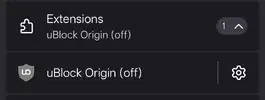
2. Aggressive Ad-Block Add-ons (uBlock Origin)
Unlike standard mobile Chrome, Firefox for Android allows full desktop-class extensions.
- The Cause: If the user is running uBlock Origin or a similar extension with aggressive, custom, or outdated filter lists, the extension might be misidentifying a XenForo asset (like a JavaScript file handling forum updates) as a tracker or ad script and blocking it.
3. Session / CSRF Token Mismatch
XenForo uses security tokens to prevent cross-site request forgery.
- The Cause: Firefox mobile aggressively sleeps tabs to save battery. If the user leaves the tab open in the background for a long time, wakes their phone up, and immediately tries to interact with the page, their session token may have expired or desynced.
- The Fix for the User: A simple hard refresh (pulling down on the page to reload) or clearing cookies/cache for the site usually fixes this.
4. Mobile Network Dropouts (Unstable IPv6/IPv4 Switching)
Mobile carriers frequently switch a phone's IP address on the fly as it jumps between cellular towers or switches from 5G to Wi-Fi.
- The Cause: If the user’s IP changes mid-session, XenForo’s security settings might reject the background AJAX request because the cookie session no longer matches the current IP address.
Not changed my adblock settings. Still showing as offJust browsing now on Firefox/Android and no problem.
The system is saying you turned on adblock last night, if you did, it'll be that. If you didn't, it'll be whatever is blocking scripts thats causing it;
View attachment 355344
Below is what AI says/it's pretty good at diagnosing tech probs;
Join the Everton conversation today.
Fewer ads, full access, completely free.
