Support: threads scrolling incorrectly

oglop44

Player Valuation: £15m
@GrandOldTeam just started today. When clicking on a thread it usually goes to the latest unread post. Now it's scrolling past that and sometimes all the way to the bottom of the page.

Viewing on chrome on Android.

Could be advert related, hard to say at this point
 
... it's an effort to have better adverts on here, but with that, you need the more modern style ad units that they bid for so it'll take me a bit of time to config.
 
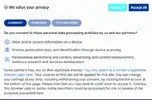
It's probably set as a flag somewhere but it'd be nice if I didn't get the accept/reject cookies window every one to two refreshes/pages:
1776252301168.webp

I get my privacy is valued but I'd prefer to not have to click reject all every few minutes :lol:
 
Your adblocker is preventing the choice being saved/remembered.
I emailed you a while back that I get conflicting adblock on/off messages within minutes of eachother on the same device as well, just weird behaviour overall - I've whitelisted/paused/removed all kinds of adblockers from me for GOT and it still does this bs FFS. Fairly new as well, didn't do it up until (I wanna say) a month or so.

Oh well, I'll bear with it for now and look into what might be blocking on my end, as I assume it will just tell you 'operagx + adblocker' currently and not much else. Ta anyway mate
 
I emailed you a while back that I get conflicting adblock on/off messages within minutes of eachother on the same device as well, just weird behaviour overall - I've whitelisted/paused/removed all kinds of adblockers from me for GOT and it still does this bs FFS. Fairly new as well, didn't do it up until (I wanna say) a month or so.

Oh well, I'll bear with it for now and look into what might be blocking on my end, as I assume it will just tell you 'operagx + adblocker' currently and not much else. Ta anyway mate

I've just searched my emails and can't find anything from the email you have on your account here - sorry if I didn't reply, maybe resend.

Yeah tracker on here just shows prolonged adblock use - if it was flickering between on and off, then it could be glitching but something on your device is blocking scripts. The example you give, isn't loaded from us, its third party. See below from AI;

This is a cookie consent banner — specifically a GDPR/privacy compliance popup. These are legally required across the EU and UK (where you're based) under data protection laws.


Why it keeps appearing:


The banner stores your consent choice as a cookie. If an adblocker is deleting tracking cookies (including the one that records "user already consented"), the site forgets your choice and shows the banner again on the next visit or page load.


How adblock causes this specifically:


  • Many adblockers (uBlock Origin, AdGuard, etc.) block or delete consent-related cookies and scripts from frameworks like OneTrust, Cookiebot, or Quantcast — which is exactly what this banner looks like (note the "1724 Partners" tab, very typical of IAB TCF consent frameworks)
  • Some filter lists specifically target these consent banners, which can block the "save preference" function from firing properly, so even clicking "Reject all" doesn't stick
  • The adblocker may also be blocking the script that checks whether consent was already given, so the site defaults to showing the banner again

Solutions for the user:


  1. Whitelist the specific site in their adblocker so consent can be saved normally
  2. Use a browser extension like "I don't care about cookies" or "Consent-O-Matic" which auto-clicks reject and handles the consent storage properly alongside adblockers
  3. In uBlock Origin, they can allow localStorage or cookies for that domain specifically

The banner itself is legitimate — it's the adblocker interfering with its memory of the user's choice.

 

Welcome

Join the Everton conversation today.
Fewer ads, full access, completely free.

🛒 Visit Shop

Support Grand Old Team by checking out our latest Everton gear!
Back
Top